Review without inventing effort.
Record a review to update Last touched without adding work hours. Keep the distinction between checking on a ticket and spending time on it.
 QueuespaceSign in
 TEAM WORK & FOLLOW-THROUGH
Give everyday requests and project work a shared home. Organize queues, schedule focused work, and keep a useful history of what happened.
Next work session · 10:30 AM
Data platform upgrade
Last touched · 5 days ago
A work session, a note, a progress update.
SEE THE DETAILS THAT MAKE A DIFFERENCE
An open ticket may be moving forward—or sitting untouched. Queuespace makes the age of the last recorded activity visible, so quiet work is easier to spot.
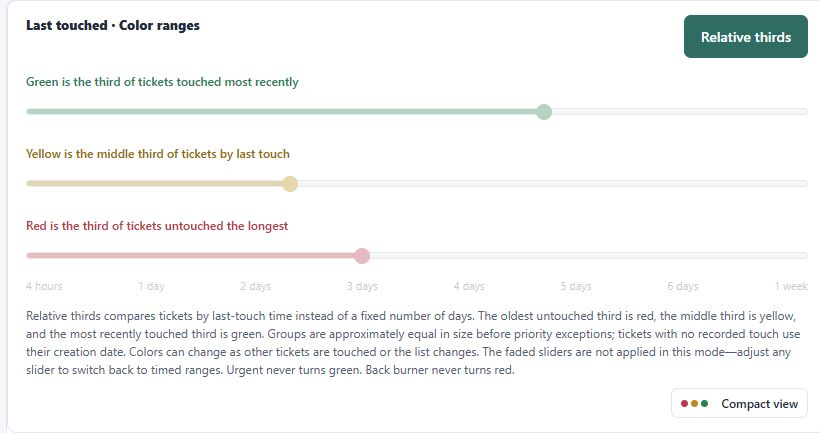
Relative thirds compares tickets by last-touch time: the oldest third is red, the middle third yellow, and the most recently touched third green.
Timed ranges uses elapsed hours. Adjust the sliders to define when a ticket needs attention, with red-threshold presets from four hours to one week.
Priority still matters: urgent tickets never turn green; back-burner tickets never turn red.
TRY THE IDEA
Illustrative normal-priority ticket · timed ranges
Example thresholds: green through 24 hours, yellow until 72 hours, red from 72 hours. This illustration does not change your app settings.
Record a review to update Last touched without adding work hours. Keep the distinction between checking on a ticket and spending time on it.
Use work timers and time logs to record effort. A ticket’s touch age shows recency; logged time shows how much work has been recorded.
Keep appointments, focused work sessions, and deadlines attached to tickets. Today, Calendar, and the scheduling mini calendar make the next commitment easier to find.
Relative groups are approximately equal before priority exceptions. Tickets without a recorded touch use their creation date; colors can change as tickets are touched or the list changes.
BUILT AROUND REAL WORK
A place for the request, the conversation, and the time it takes to move things forward.
TICKETS & TEAM QUEUES
Keep standard tickets organized in team queues, with ownership, priority, notes, and a useful work history. See what has been touched recently and what needs attention.
SCHEDULING & FOLLOW-THROUGH
Schedule work sessions, appointments, and deadlines. Use Today and Calendar to make the next commitment visible alongside the work it belongs to.
NOTES & WORK HISTORY
Record notes and time against a ticket so the next person can pick up the thread. Team members can contribute to their team’s linked project ticket.
CONNECTED PROJECT TICKETS
Keep published Planspace initiatives and their team tickets distinct from everyday requests. Designated leads report progress; logged hours provide supporting context.
THE CONNECTED VIEW
A published initiative brings team progress, logged work, and planned effort into the same view. Keep everyday tickets separate while project tickets retain their initiative and phase context.
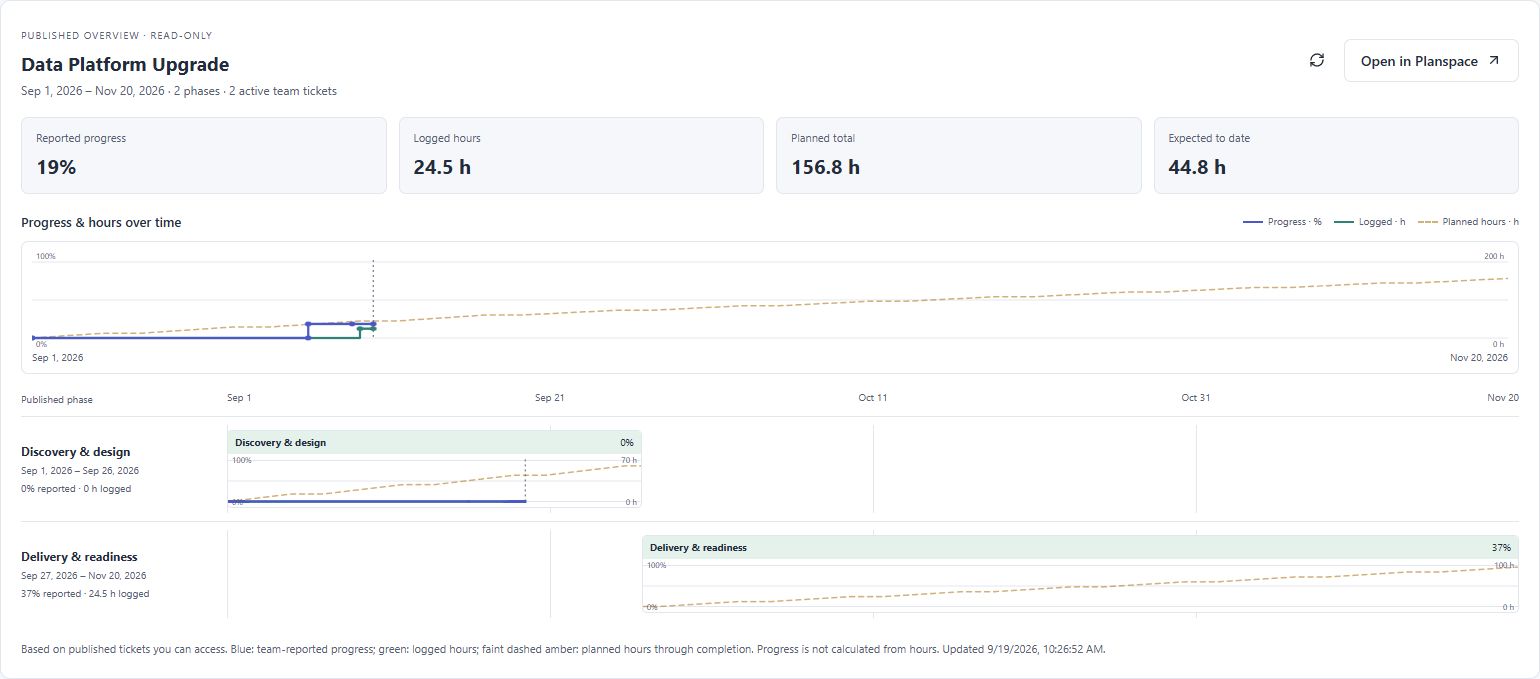
One team ticket per phase. Team members contribute notes and work logs; the designated lead owns the progress slider.
Recorded hours add context to the progress report. They do not calculate or replace the completion percentage.
The faint dashed line extends to the published finish. Compare logged effort with the planned total and expected hours to date.
BETTER TOGETHER
Connect Planspace and Queuespace to carry initiatives into team work—and bring reported progress back to the roadmap.
See how they connectPublish deliberately. Report progress continuously.
A PLAN FOR YOUR TEAM
Choose the shared workspace allowance that fits your organization.
Get started with a shared home.
No subscription charge
Space for a growing team.
Billed monthly
More room for teams and projects.
Billed monthly
Prices in USD. *Paid membership is subject to fair use and provider limits. **Connecting the apps requires paid access in both, purchased separately or through a bundle. Subscription allowances are shared across the client’s administrators.
Planning + executionBundle both apps and save 10%.A CLEARER WAY TO WORK